Anthropic announced on 26 August that Claude now has a browser built into Cowork on the desktop app. You give it a task involving a website, a browser opens in the side panel, and Claude navigates, reads pages, clicks and types while you carry on with something else.
No extension, nothing to install. It is rolling out over this week to Pro, Max and Team plans on macOS, Windows and Linux, with Linux still in beta. Enterprise admins can switch it on from today.
That is the announcement. Let me tell you what actually happened when I put it to work on my own site, because that is more useful to you than the press release.
First, a disclosure
I use Claude to research and draft on this blog. It is not a secret, and I would rather say it plainly than have you work it out on your own.
For the last few days it has been working directly inside my site’s admin. So when I say I have tested this, I mean it has been editing my live site — not that I watched a demo video and formed an opinion.
The two-browser thing everybody will get wrong
This is the part most coverage is going to blur, so let us get it straight first.
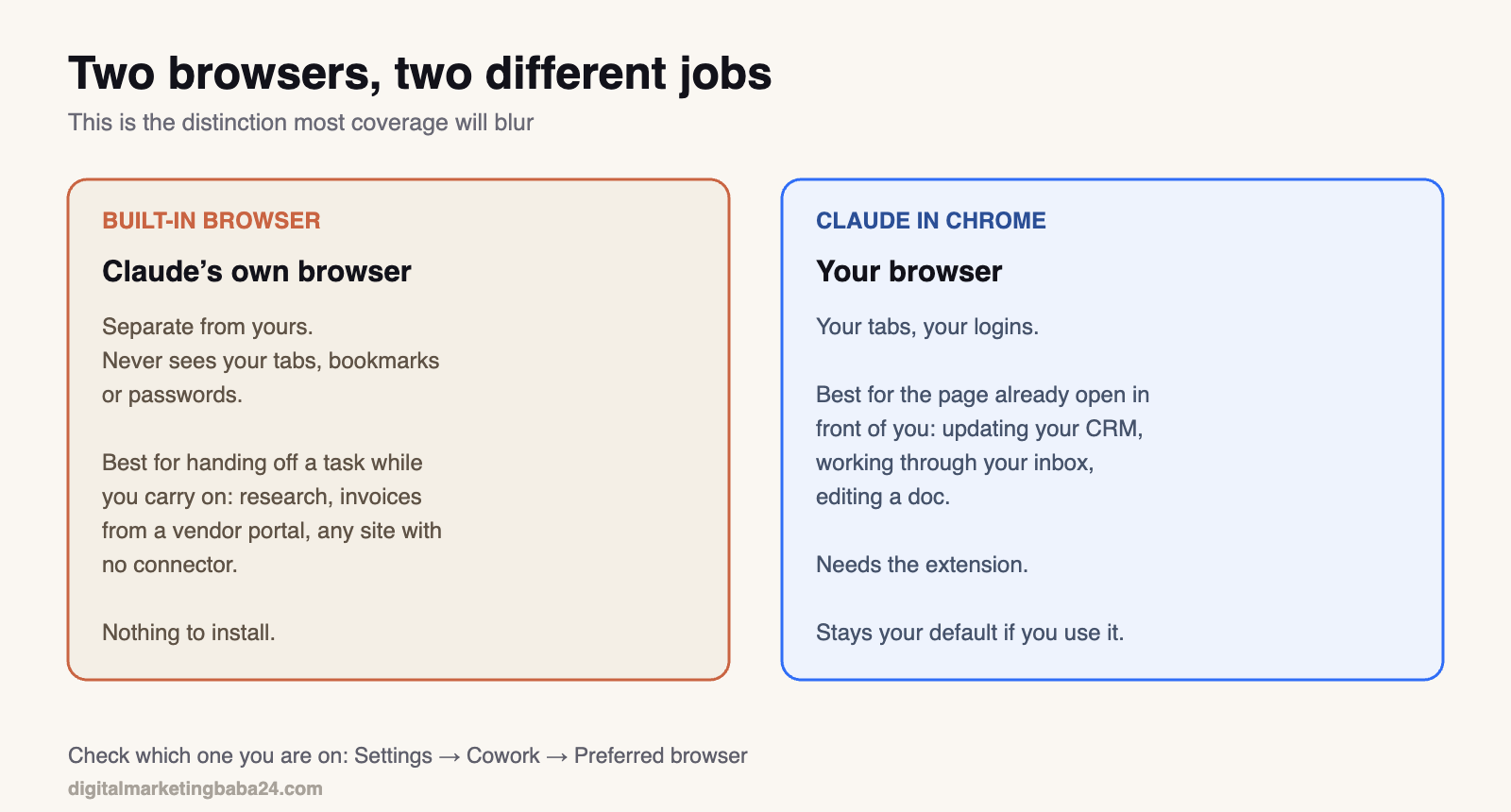
Claude in Chrome is the extension. It works in your browser, with your tabs and your logins. Right for the page already open in front of you — updating your CRM, going through your inbox, editing a doc.
The built-in browser is Claude’s own browser inside the desktop app. Separate from yours. It does not see your tabs, bookmarks or passwords. Right for handing off a web task while you keep working — pulling research, collecting invoices from some vendor portal, dealing with a site that has no connector.
If you already use Claude in Chrome, that stays your default. Otherwise the built-in one gets used. You can switch in Settings → Cowork → Preferred browser. Worth checking which one you are on before you assume anything.
You can bring your logins across site by site — from Chrome, Edge or Firefox on macOS, and from Firefox on Windows and Linux. Banking, email and single sign-on sites are left out unless you specifically include them.
What it got right
The genuinely impressive part is that it works on real, messy admin interfaces. Not clean demo pages.
On my site it opened posts, rewrote content in the code editor, set Rank Math focus keywords and meta descriptions, generated images and uploaded them to my media library, cropped a screenshot, fixed alt text that was sitting there as IMG_0018, and created several drafts from scratch.
One post went from a Rank Math score of 0 to 81. On another it had a date wrong; I sent it a better source, and it corrected the error throughout the piece — including inside an image it had already made and uploaded.
What went wrong, twice
Now the part you will not find in any announcement.
It published a draft I had not asked it to publish.
To its credit, it noticed on the very next screenshot, told me straight away without me asking, and set the post back to draft through the API. The post was live for well under a minute. It also flagged something I would not have thought of myself: if I had any plugin wired to fire on publish — a social auto-poster, an email-to-subscribers tool — that may well have gone out, and you cannot pull those back.
Nothing did fire, in my case. But that is luck, not design.
The lesson is not “AI is dangerous.” It is something far more specific and practical. An agent clicking by pixel position is fragile the moment a page moves underneath it. If you are letting one work inside a CMS, know where your irreversible buttons are sitting.
And it could not get past my own login screen.
This is going to irritate some people. It should not. It is the correct behaviour and it is deliberate — the same reasoning behind excluding banking and email sites by default when you bring logins across. An agent that will cheerfully type your credentials into any box it finds is a much worse product than one that refuses.
But do plan around it. If you hand off a long task and wander off for chai, you may come back to find it has been sitting at a login screen for twenty minutes.
The part Anthropic is honest about
There is a section in the announcement about prompt injection — instructions hidden inside a webpage that try to redirect the agent into doing something you never asked for.
Anthropic’s own words:
Those measures meaningfully reduce the risk but can’t eliminate it, so we recommend starting on sites you trust.
I appreciate a vendor writing that down rather than burying it in a footnote. Take it seriously, though. The risk is not theoretical, and it grows with exactly the thing that makes this useful — letting an agent go off and work somewhere unattended.
I saw the conservative side of this in practice too. When I asked for an image taken from a leaked Apple video, it declined to republish someone else’s footage on my site and told me that was my call to make, not its own. Slightly inconvenient in the moment. Correct, on reflection.
So is it actually useful?
Yes, and more than I expected.
For a blogger or a small team with no engineering support, the meaningful shift is that Claude can now operate the tools you already use, without waiting for somebody to build an integration first. Most of us live inside four or five web apps that will never get a proper connector. This gets at them.
For SaaS teams the interesting question is a different one. If agents can operate your product through the browser, your UI has quietly become an API that you did not design. That is worth thinking about before your competitors think about it.
How to start
Give it something reversible and watch it work. Not your live storefront, not your billing.
Check Settings → Cowork → Preferred browser so you know which browser you are actually on. Keep the side panel visible for the first few tasks — seeing what it clicks is how you learn where it is strong and where it is clumsy. And if it is working somewhere with a Publish, Send or Delete button, stay in the room.
I will keep using it. I will also keep watching the screen.
Related: LinkedIn quietly shipped a setting that lets recruiters call your phone.
Source
Anthropic’s announcement, 26 August 2026.

Ashok Kumar has spent over a decade in marketing, including six years running account-based marketing programmes for B2B teams — working day to day in LinkedIn Ads, Marketo and Salesforce.
He writes Digital Marketing Baba 24 about marketing and AI, martech and SEO: mostly the things he has had to work out himself, with the numbers included.